Your ad-free experience, your choice
Index
What are Acceptable Ads?
Acceptable Ads are ads that aren’t intrusive or annoying. They are respectful, don’t interfere with content, and are clearly labeled with the word “advertisement” or its equivalent. In order for an ad to be an “Acceptable Ad”, it must adhere to standards that have been set forth by the Acceptable Ads Committee.
Ads that abide by the Acceptable Ads Standard are placed on an allowlist. The ads on the allowlist are then shown to ad-blocking users who allow Acceptable Ads.
Most websites rely on advertising to stay free. Adblock Plus blocks the intrusive ones by default — and gives you the choice to support sites you trust by trading a little bit of your attention for a small number of non-intrusive, clearly labeled ads.
What is the Acceptable Ads Committee?
The Acceptable Ads Committee consists of a diverse mix of online experts – from companies, non-profit organizations, etc. – interested in making better ad standards.
Acceptable Ads criteria
Acceptable Ads, as defined by the Acceptable Ads Committee, have to comply with the following criteria:
Desktop criteria
Placement
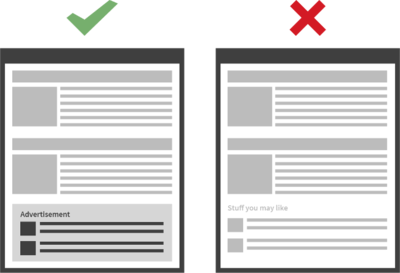
Ads must not disrupt the user's natural reading flow. Such ads must be placed on top, side or below the Primary Content. 1

Distinction
Ads should always be recognizable as ads, and distinguishable from all other content (e.g. are not hiding the label, are not misleading users into thinking an ad is part of the primary content). Ads should be clearly marked with the word "advertisement" or its equivalent.
Size
Individual ad-size requirements depend on the placement of the ad:
- When placed above the primary content, the maximum height of an ad should be 200px.
- When placed on the side of the primary content, the maximum width of an ad should be 350px.
- When placed below the primary content, the maximum height of an ad should be 400px.
Ads must always leave sufficient space for the Primary Content on the common screen size of 1366x768 for desktop, 360x640 for mobile devices and 768x1024 for tablets. 2 3 4
All ads that are placed above the fold (the portion of the web page visible in the browser window when the page first loads under the common screen size), must not occupy in total more than 15 percent of the visible portion of the web page. If placed below the fold, ads must not occupy in total more than 25 percent of the visible portion of the webpage.

Specific criteria
Text ads
Text ads designed with excessive use of colors and/or other elements to grab attention are not permitted.
Image ads
Static image ads may qualify as acceptable, according to an evaluation of their unobtrusiveness based on their integration on the webpage.
In-feed ads
For ads in lists and feeds, the general criteria differ depending on:
- Placement requirements
Ads are permitted in between entries and feeds. - Size requirements
In-feed ads are permitted to take up more space, as long as they are not substantially larger than other elements in the list or feed.
Search ads
For search ads - ads displayed following a user-initiated search query - the criteria differ depending on:
- Size requirements
Search ads are permitted to be larger and take up additional screen space.
Ads on pages with no primary content
Only text ads are allowed. For webpages without any primary content (e.g. error or parking pages), the criteria differ depending on:
- Placement requirements
No placement limitations. - Size requirements
No size limitations.
Mobile criteria
Placement Requirements
- Static ad types (e.g. 6x1 banner and 1x1 tile ad) are allowed to be placed anywhere on the mobile page
- Small ads (6x1 banner or smaller) are allowed to be placed as a sticky ad on the bottom of the screen. Other formats are not allowed to stick.
- Large ad types (e.g. native tile ads) are only allowed to be placed under the Primary Content. 5 1
Size Requirements
Ads showing on mobile screens are bound to the following size restrictions:
- Ads implemented on the scrollable portion of the webpage must not occupy in total more than 50 percent of the visible portion of the webpage. 6
- Ads implemented as a ‘sticky ad’ have a maximum height restriction of 75px (or 15%).
- Below the Primary Content, ads are limited to 100% of the screen space. 7
Animations
Animations are allowed for the 6x1 ad type when placed as a ‘sticky’ ad on the bottom of the screen. Animations have to comply with the LEAN standard for animations, and a close button or some other closing mechanism must be included. 8
Other Acceptable Ads formats?
Are your ads displayed on alternative screens, or are you convinced that you have an innovative Acceptable Ads format which doesn't fit the ads outlined above? Let us know!
Why is the Acceptable Ads feature enabled by default?
Acceptable Ads is on by default because we believe the best outcome for users is a web with fewer, better ads — not a binary choice between all ads or none. By allowing only ads that meet strict, independently verified criteria, Adblock Plus helps push the entire ad industry toward higher standards. You can turn it off at any time in two clicks.
Want to block everything? No problem.
You can disable this feature at any time:
Adblock Plus for Chrome, Firefox (versions 3 and above), Maxthon, Opera, Yandex Browser
- From your browser’s toolbar, click the Adblock Plus icon and select the gear icon in the upper right corner.
- From the General tab, scroll to the Acceptable Ads section.
- Uncheck Allow Acceptable Ads.
- Close the tab.
Adblock Plus for Safari
- From the Safari toolbar, click the Adblock Plus icon and select Open Adblock Plus.
- Uncheck Allow Acceptable Ads.
- Close the tab.
Adblock Plus for Firefox (versions 1 and 2)
- Click the Adblock Plus icon and select Filter preferences.
- Uncheck Allow some nonintrusive advertising.
Adblock Plus for Internet Explorer
- Click the Adblock Plus icon and select Settings.
- Uncheck Allow some nonintrusive advertising.
Adblock Plus for iOS
- Open Adblock Plus for iOS.
- Tap the Settings icon at the bottom of the page.
- From the Settings page, tap Acceptable Ads.
- Toggle off Allow some nonintrusive ads.
Adblock Browser for Android
- Open Adblock Browser for Android.
- Tap the menu icon and select Settings.
- Tap Ad blocking > Acceptable Ads.
- Uncheck Allow some nonintrusive advertising.
Adblock Plus for Samsung Internet
- Open Adblock Plus for Samsung Internet.
- Uncheck Allow some nonintrusive advertising.
-
The 'Primary Content' is defined as (based on Mozilla's description of the
<main>HTML element): The Primary Content consists of content that is directly related to, or expands upon the central topic of a document or the central functionality of an application. This content should be unique to the document, excluding any content that is repeated across a set of documents such as sidebars, navigation links, copyright information, site logos, and search forms (unless, of course, the document's main function is a search form). ↩↩ -
The 'common screen size' for desktop is 1366x768, based on data from StatCounter. ↩
-
The 'common screen size' for mobile is 360x640, based on data from StatCounter. ↩
-
The 'common screen size' for tablets is 768x1024, based on data from StatCounter. ↩
-
Large ad: any ad >300px height ↩
-
The visible portion of the webpage is defined as a standard CSS pixel size of 360x512px (Samsung Galaxy S7 with the SBrowser), which is based on the standard viewport of 360x640px, but with the OS- and browser UI elements deducted. ↩
-
This means that users can scroll past the primary content and an ad unit served after it can take up the whole screen; but following this ad unit, additional ads cannot be implemented. ↩